“What does this error mean?”
Turn a confusing message into a clearer next step. Investigate a file or log, then ask follow-up questions until it makes sense.
A LITTLE HELP. ALWAYS NEAR.
A native assistant for understanding your system and getting things done. Ask, investigate and act—with useful explanations, clear decisions and a place to pick up where you left off.
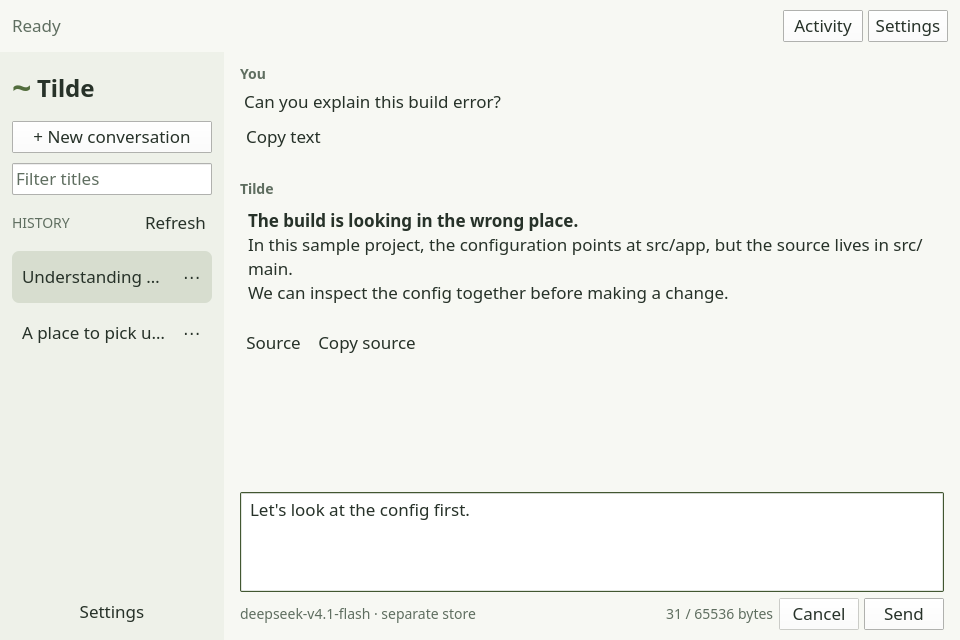
Curious about Linux? Ask away.
Know your way around? Get to work.
Need to step away? Keep your place.
A GOOD PLACE TO START
Bring a question, a project or a problem. Tilde meets you there, with explanations when you want them and useful actions when you’re ready.
Turn a confusing message into a clearer next step. Investigate a file or log, then ask follow-up questions until it makes sense.
Inspect files, prepare changes and review exact shell actions before approving them. Work runs under your ordinary account.
Find the conversation, your draft and the task’s current state. Keep the context you’ve already built together.
LIFE DOESN’T HAPPEN IN ONE SITTING
Tilde keeps the conversation and task state, with a separate background daemon that can keep working while the window is closed.
Your conversation and acknowledged task state are saved.
The running daemon stays separate from the interface.
Reopen Tilde to see the conversation and the task’s current state.
AND AFTER A RESTART?
Tilde reconciles retained state when it starts again. If an action’s outcome is uncertain, it pauses for inspection instead of blindly running it twice.
What we’ve tested ↗Durability has boundaries. Storage-loss recovery was checked in a calibrated disposable guest; it is not a guarantee against every hardware failure. Read the qualification scope ↗
LET’S GET YOU SETTLED IN
You choose the model, the files Tilde can access and whether it starts in the background when you log in.
Choose the Arch x86_64 package, or build from the GitHub source. Requirements and installation steps are in the guide.
Choose an install path ↗Start the daemon, open Tilde and configure a supported provider or an existing compatible local endpoint.
Follow model setup ↗Begin by asking about a harmless sample project file. Review any exact shell action before it runs.
Your first conversation ↗Model availability, provider charges and data handling depend on your setup. Background login startup is optional. Understand Tilde’s authority ↗
MAKE A LITTLE ROOM FOR TILDE
Version 0.1.1 is an early preview. Check the requirements and known limitations, then follow the guide to get started.
AN OPEN PROJECT. A SHARED DIRECTION.
Read the code, share a reproducible issue or help shape the next update. Tilde is a native Linux assistant, and there’s room to make it better.